Collateral in TMS – Everything You Need to Know
For new investors, collateral seems to be a little confusing topic. In this article, we will answer the queries related to collateral in TMS (Trading Management System). We will cover everything from what collateral is, how to load it, how to refund it, and other related FAQs.
What is Collateral?
Collateral is an amount you have to load to your TMS account just before you buy any stocks. This amount is loaded to the TMS account just for security purposes. After you buy any stocks, the broker will deduct the amount from this collateral. One of the features of TMS is the banking integration using Nepal Clearing House Limited (NCHL).
What is the Collateral Amount and Trading Limit?
The collateral amount is the amount of your security (cash deposit, cheque deposit, etc.) and the Trading Limit is the limit provided by brokers for your transaction. The trading limit is normally four times your collateral amount.
How to Load Collateral?
- Login to your TMS.
- Go to Fund Management - Collateral Management.
- Click on Load Collateral.
- Select your bank/payment tool (eSewa, Khalti, ConnectIPS).
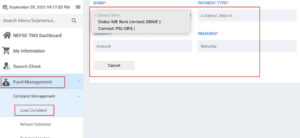
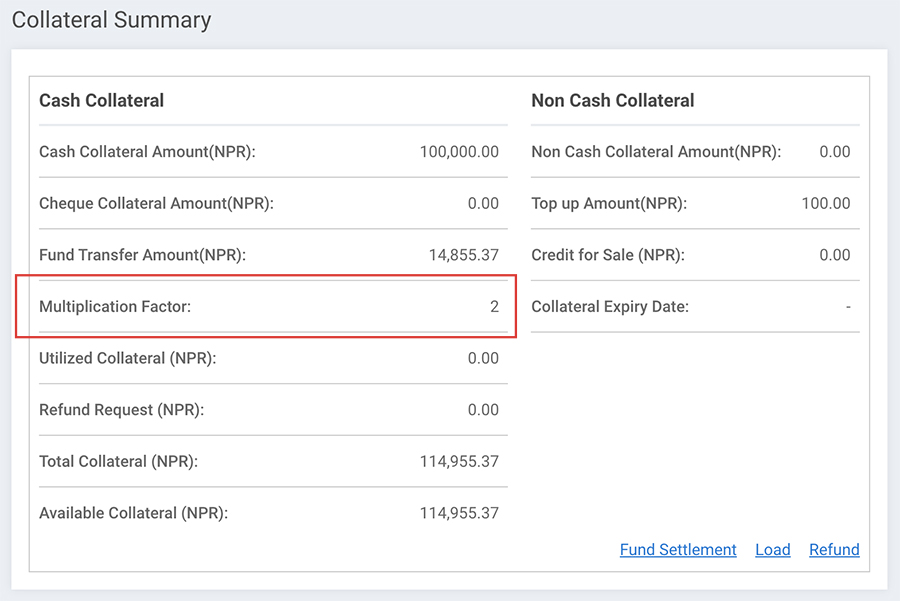
Collateral Summary & Payment Details
After choosing the payment mode, you will see a screen as shown below to fill the amount. You can also view your collateral summary in the TMS dashboard.
Video Guides: TMS & Collateral
Why Do I Need to Load Collateral?
Collateral is the amount that is loaded just for security purposes. Sometimes, the stock buyer buys the stock and does not come to contact. At this time, the broker has to pay the amount to the seller. Collateral ensures the broker is protected against such defaults.
How Much Collateral Do I Need to Load?
There is no hard and fast rule about how much exactly needs to be loaded. But in general, brokers ask you to load at least 25% of the total share buying amount. For example, if you are buying stock worth NPR 1,00,000, you have to load at least 25% (NPR 25,000) as collateral.
Go to: Fund Management > Collateral Management > Manage Collateral
How to Pay After Buying Stock?
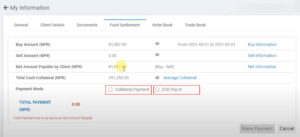
Go to: Fund Management > Fund Settlement > Buy Information. You will have two options for payment:
1. EOD Pay In
EOD (End of Day) payment is the remaining amount you have to pay besides your collateral. If you loaded 25% collateral, you must pay the remaining 75% via EOD Pay In. The amount transfers from your bank account to the broker account through NCHL.
2. Collateral Payment
The amount payable is deducted directly from your available Collateral balance. Go to Payment Settlement, click "Make Payment", select "Collateral Payment", enter the exact amount, and confirm.
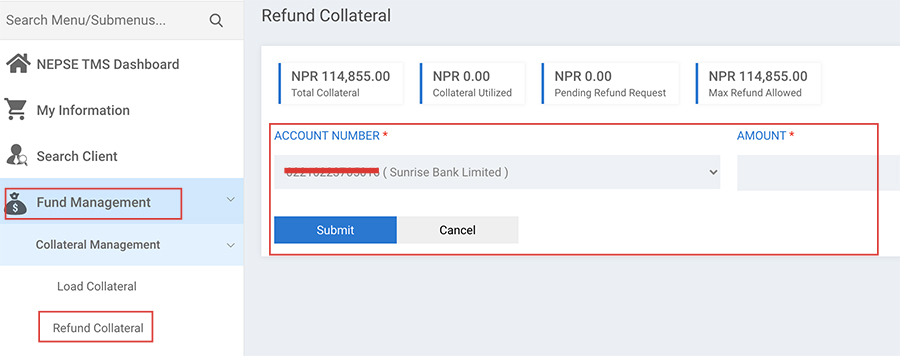
How to Refund Collateral from NEPSE TMS?
If you have loaded amount in your TMS and will not buy any stock for a long time, you can refund your collateral amount back to your bank account.
Go to: Fund Management > Refund Collateral > Choose Bank > Enter Amount
Frequently Asked Questions
Can I Use Global IME Bank M-banking to load collateral?
No, you need to have internet banking of Global IME Bank. You cannot load collateral from Global IME M-banking.
Should I have my own Connect IPS account to load collateral?
No, it is not compulsory. You can use others' Connect IPS to load collateral. However, we recommend having your own Connect IPS account for easier stock trading.
What is Cash Collateral vs Non-Cash Collateral?
Cash Collateral – Actual cash deposited by you via Connect IPS, internet banking, cheque, or direct bank transfer.
Non-Cash Collateral – Adjusted by the broker (not real cash deposited by you).